
1. Execution Contexts and Lexical Environments
- Syntax Parsers vs Execution Contexts vs Lexical Environments
- Syntax parsers:
- A program that reads your code and determines what is does and if its grammar is valid.
- An interpreter that translates your code to machine readable code.
- Sometimes, syntax parser can do automatic semicolon insertion for you.
- Syntax parser is part of Javascript engine.
- Lexical environments:
- Where something sits physically in the code you write.
- The word ‘lexical’ means having to do with words or grammar.
- Lexical environment is important because the way we see code written gives us an idea of where they actually sit in the computer’s memory.
- Execution contexts:
- A wrapper to help manage the code that is running.
- The execution context determines which lexical environments are running. It also contains things beyond what were written as JavaScript is a whole set of programs that someone else wrote.
- Syntax parsers:
- Name/Value Pairs vs Objects
- Name/value pairs:
- The name may be defined more than once, but only can have one value in any given context. That value may be more name/value pairs.
- Object:
- The simplest definition when talking about Javascript.
- An object is a collection of name/value pairs.
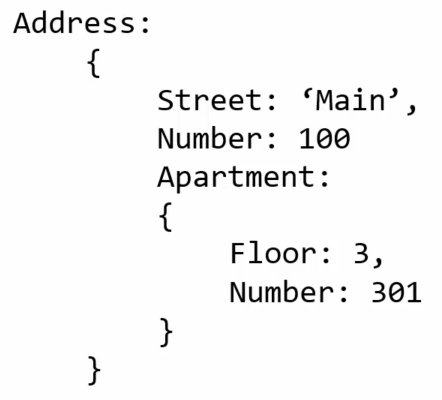
- Name/value pairs:
- The global environment and the global object
- Whenever code is run in JavaScript. It is run inside an execution context.
- Execution context is a wrapper that wraps the currently executing code in an execution context.
- There’s more than one execution contexts run during a javascript program usually.
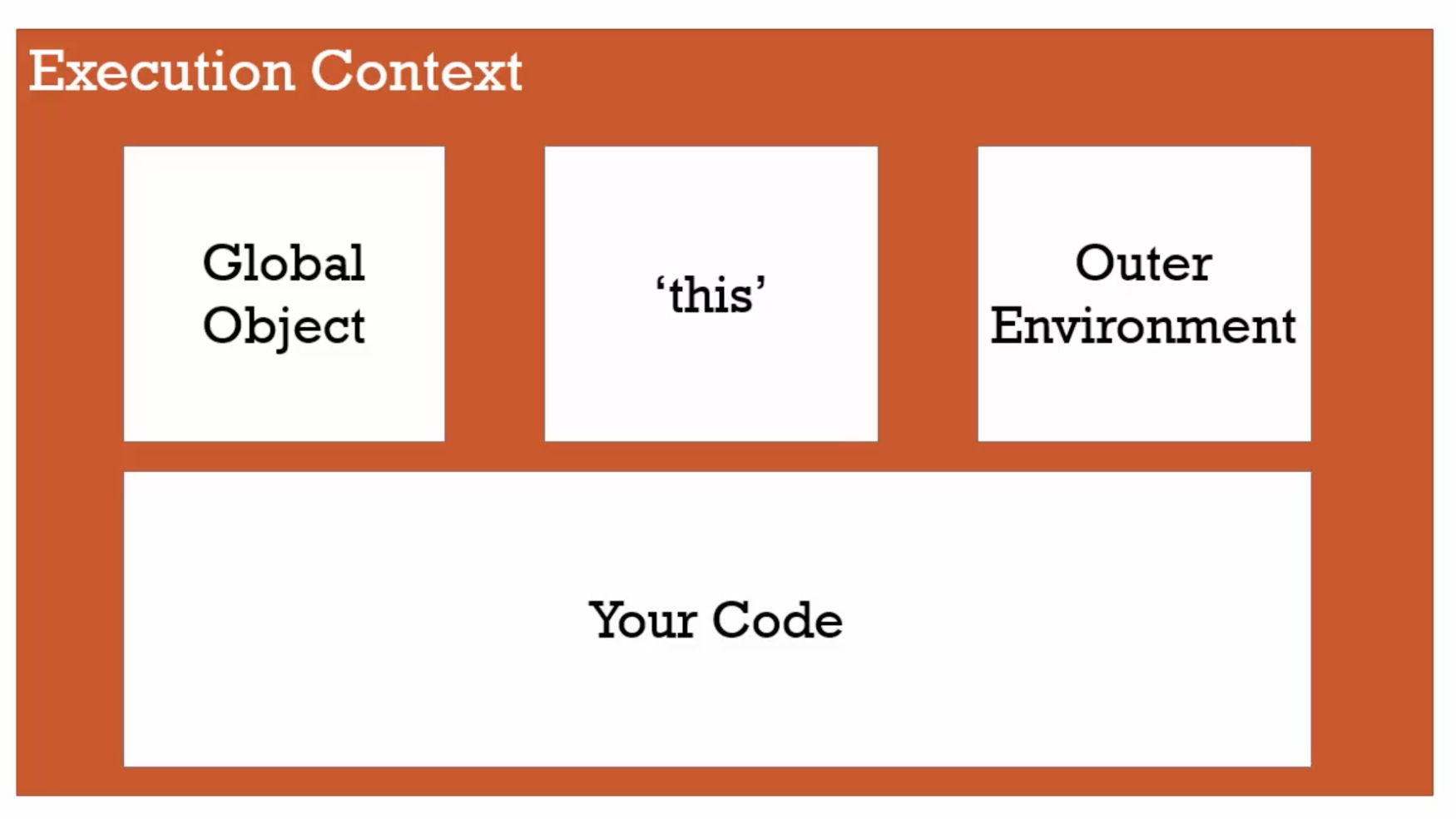
- The global execution context creates two things for you:
- Window Global object
thisvariable
- The javascript engine creates two things whenever your code is run.
- What does
globalmean in JavaScript?- “Not inside a function”
- Summary:
- The execution context - Creation and hoisting
- Hoisting (No explanation, observe only)
Run 1:
b();
console.log(a)  ;

var a = 'Hello World!';

function b() {
  console.log('Called b!')
}

// OUTPUT
Called b!
Undefined
Run 2:
b();
console.log(a);

function b() {
  console.log('Called b!')
}

// OUTPUT
Called b!
Uncaught ReferenceError: a is not defined
Run 3 (The code behave as if):
var a

function b() {
  console.log('Called b!')
}

b();
console.log(a);
This happens because what is executing is not what is written, as it is translated by the JavaScript Engine. It is also not as simple as JavaScript Engine moving the code physically.
- To understand why it happens:
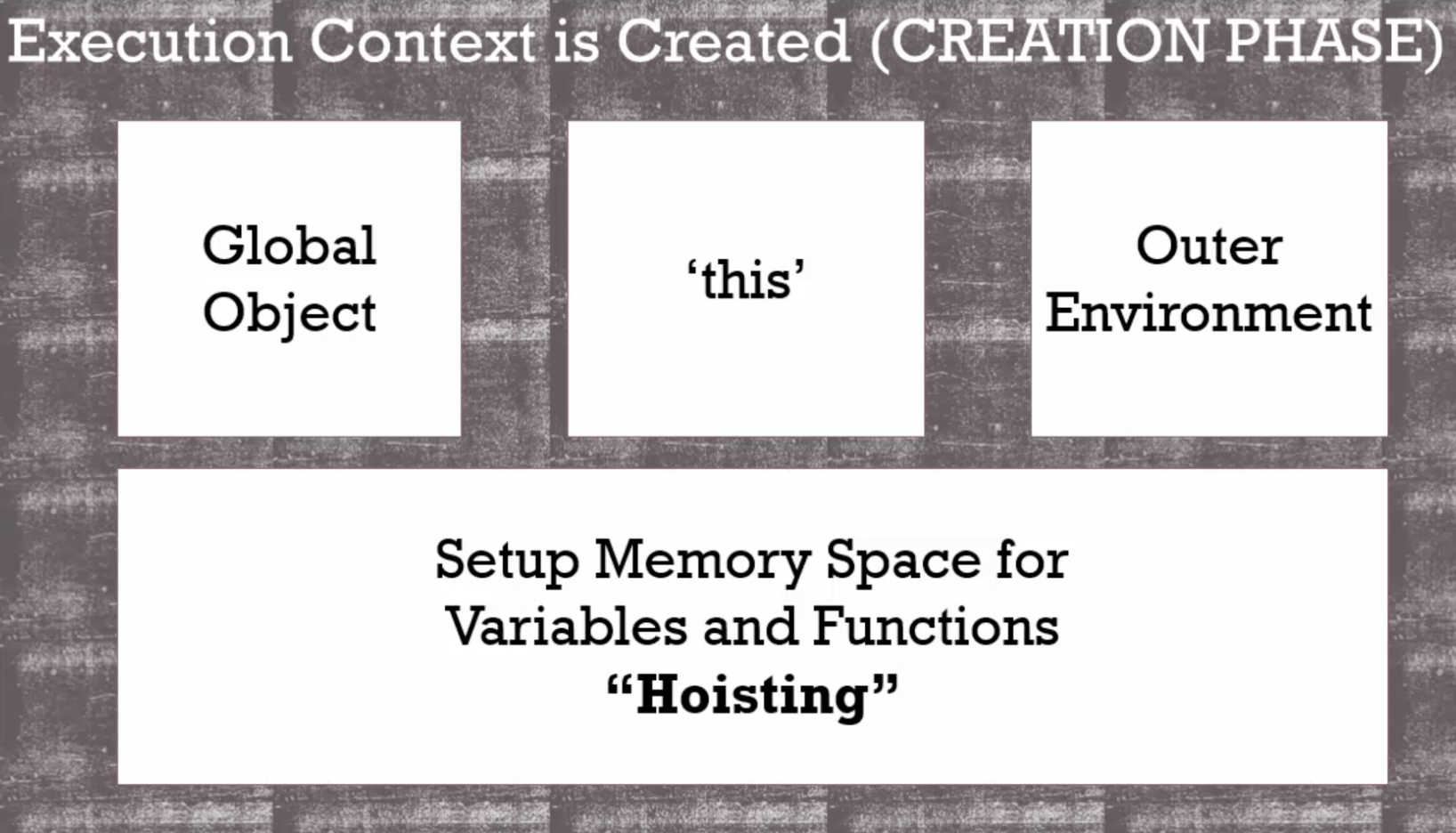 First phase: The creation phase
- Before your code begins to be executed line by line, the JavaScript Engine has already set aside memory space for all the variables and functions you had created in the entire code. As a result, these functions and variables exists in memory.
- For variables, JavaScript puts a placeholder, called
undefinedbecause it does not know what the value may end up. All variables in JavaScript are initially set toundefined. Lesson to learn: Do not rely on hoisting, follow the practice to avoid troubles. Always write the code as followed so that you do not caught up in that trap.
var a = 'Hello World!';

function b() {
  console.log('Called b!')
}

b();
console.log(a);
- Hoisting (No explanation, observe only)
- Conceptual Aside: JavaScript and
undefined.

undefined: A special value that JavaScript has within it internally that means the variable has not been set.- It is an actual value that would take memory space.
- It is the value that variables received during the creation phase, the first phase of creating an execution context sets up the memory of the variable.
- Never do the following:
jsx a = undefined- It works but will cause troubles as we’re not sure
undefinedmeans you have assigned it or the JavaScript engine has set it. This will improvedebugging. - It is preferably to let
undefinedmeans that ‘I, the programmer never set the value’.
- It works but will cause troubles as we’re not sure
- The execution context - Code execution
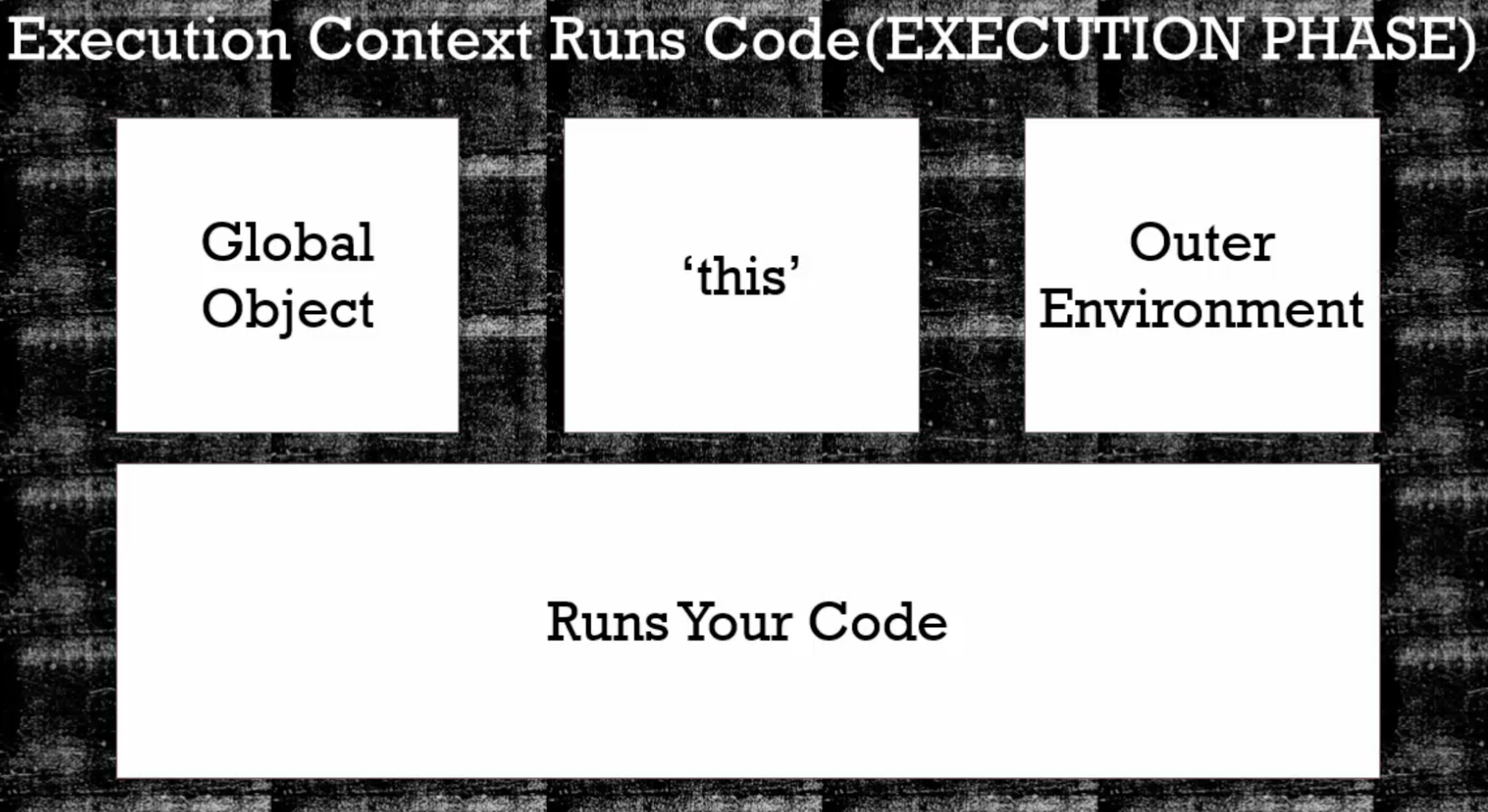 Second phase: The execution phase.
creation phase: when setting up the variables, function and memory.execution phase:Runs the code written line by line, interpreting it, converting it and compiling it.Example output:
function b() {
 console.log('Called b!')
}

b();

console.log(a);

var a = 'Hello World!';

console.log(a);

// OUTPUT
Called b!
undefined
Hello World!
- Conceptual Aside: Single Threaded, Synchronous Execution
- Single threaded: One command is being executed at a time. JavaScript behaves in a single threaded manner.
- Synchronous execution: The code is executed one line at a time in the oder that it appears.
- Function Invocation and the execution stack
- Invocation: Running a function; calling a function.
- Every time you invoke a function in JavaScript, a new
execution contextis created (just like the global one) and placed on theexecution stack, it will have its own space for variables and functions. It will go through that create phase, and then it will execute line by line the code within the function.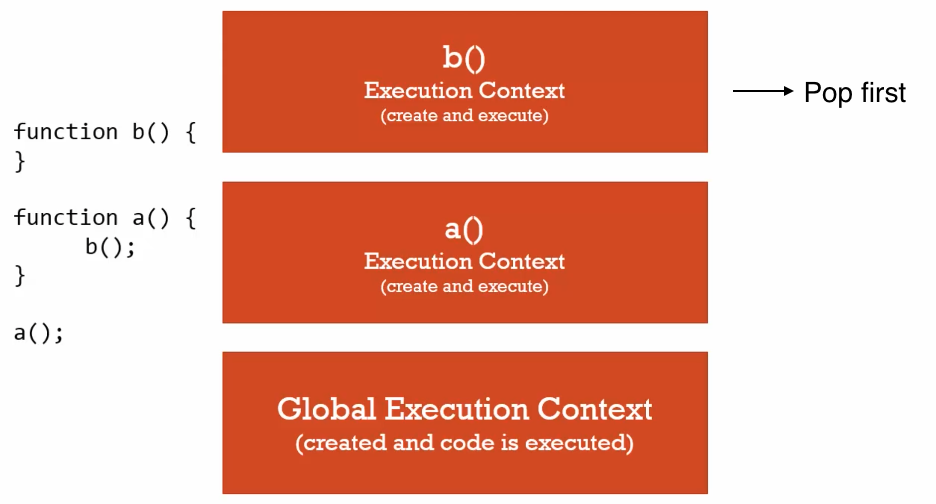
Functions, Context, and Variable Environments
- Variable environment: Where the variables live.
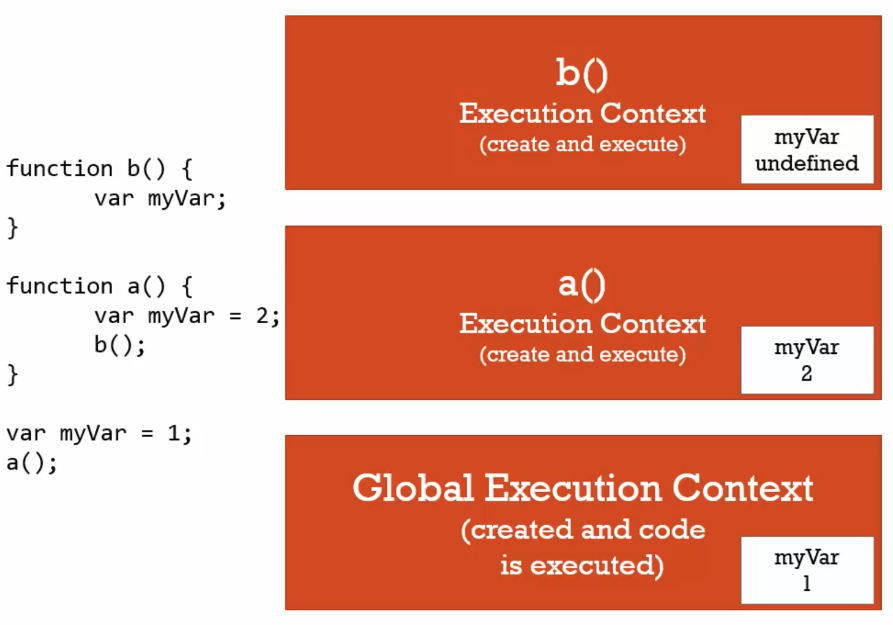
- Even though
myVaris declared 3 times. They are distinct, unique and they do not touch each other. These variables were defined in its ownexecution context. Run 1 (Example):
function b() {
 var myVar;
 console.log(myVar);
}

function a() {
 var myVar = 2;
 console.log(myVar);
}

var myVar = 1;
console.log(myVar);
a();
console.log(myVar);

// OUTPUT
1
2
undefined
1
- Variable environment: Where the variables live.
The scope chain (Important)
- Run 1 (Example):
function b() {
    console.log(myVar)
}

function a() {
    var myVar = 2;
    b();
}

var MyVar = 1;
a();

// OUTPUT
1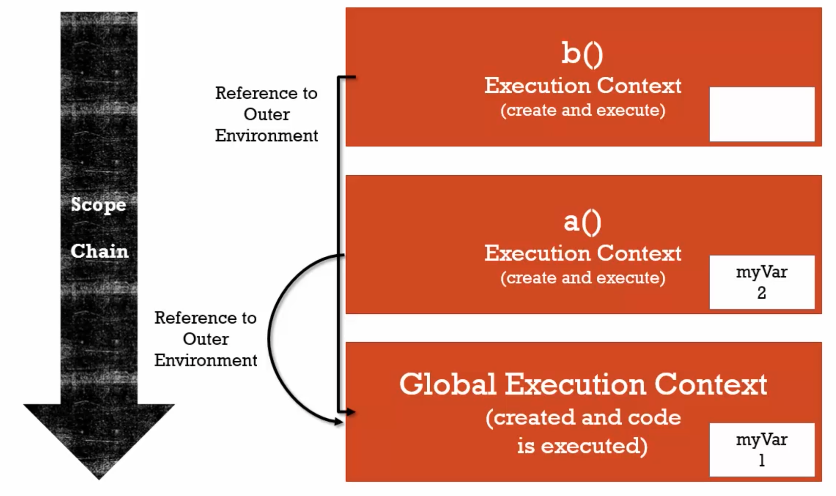
function b()lexically sits on top of the global environment.- When you ask for a variable while running a line of code inside any particular execution context, if JavaScript cannot find that variable, it will look at the
outer referenceand go look for variables there. - The execution stack can be very tall in practice. JavaScript may search for the variable all the way to the global execution context until it finds or it does not find. The whole chain is called the
Scope Chain.
Run 2 (Example):
 function a() {
     function b() {
         console.log(myVar);
     }

     var myVar = 2
     b();
 }

 var myVar = 1;
 a();

 // OUTPUT
 2
Run 3 (Example):
 function a() {
     function b() {
         console.log(myVar);
     }

     b();
 }

 var myVar = 1;
 a();

 // OUTPUT
 1
Scope, ES6, and Let
Scope: where a variable is available in your code, and if it’s truly the same variable, or a new copy.varvsletvar let The value= undefinedcan be access without assigned any given value.allows block scoping, where you need to declare and assign a value before you can use it.It is only available inside a block {}. E.g. if statement and for-loop, at that period of time for the running code. If you have a loop to run the code over and over again,letwill assign different variable in memory each time for the loop is running.
Asynchronous callbacks
- Even though the javascript engine, rendering engine and http request may be running
asynchronouslyinside a browser. Javascript engine issynchronous.
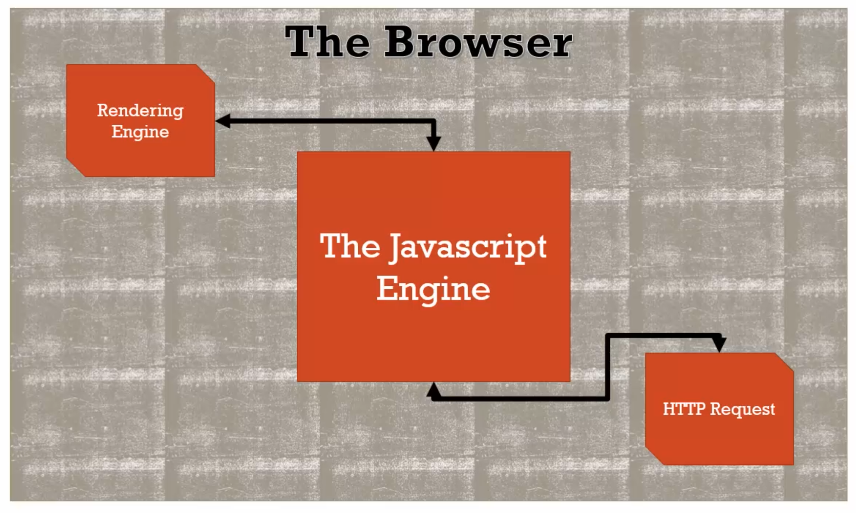
- The
event queueonly get looked at by the JavaScript when theexecution stackis empty.
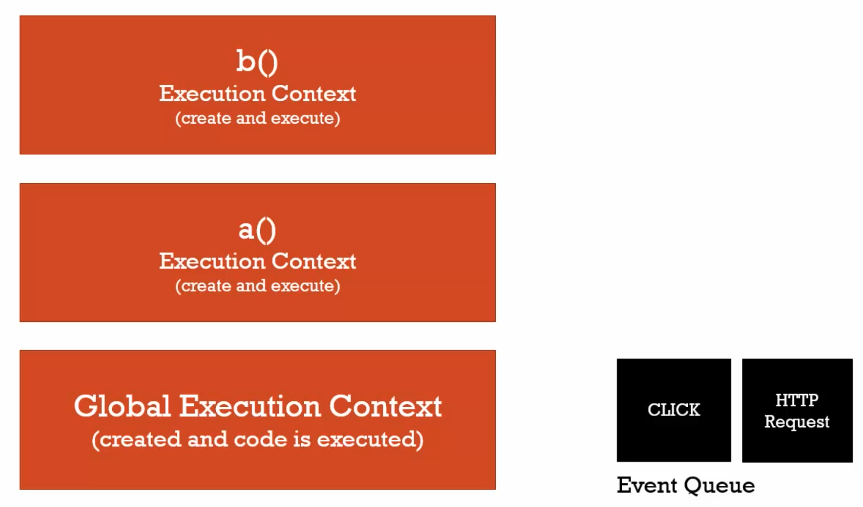
- Even though the javascript engine, rendering engine and http request may be running
2. Types and operators
- Conceptual aside: Types and javascript.
Dynamic typing: You do not tell the engine what type of data a variable holds, it figures it out while your code is running. Variables can hold different types of values because it is all figured out during execution. It is different fromstatic typing.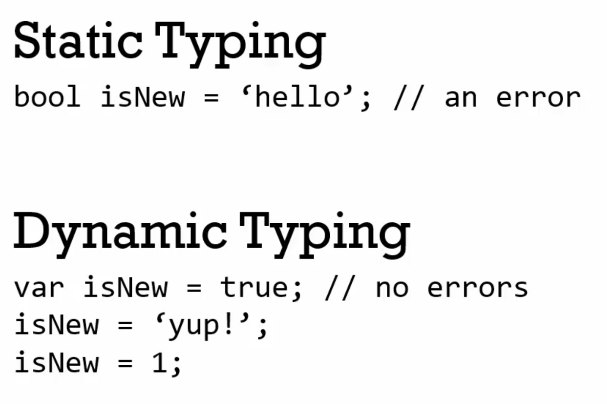
Primitive types: A type of data that represents a single value (That is not an object). There are 6 primitive types in javascript:Undefined: It represents lack of existence (Note: you should not set a variable to this).null: It represents lack of existence (Note: you can set a variable to this).boolean:trueoffalse;number: There is only 1 number type in JavaScript. It is a floating point number (There is always some decimals). The drawback is sometimes it makes math a little weird.string: A sequence of characters (inside‘’or“”).symbol: Used in ES6 only. (Note: Not fully supported by all browsers yet.)
Conceptual aside: Operators
Operator: A special function that is syntactically (written) differently. Generally, operators take 2 parameters and return 1 result. Operator can be viewed as a function that JavaScript provides usinginfix notation.Types of notations:
infix prefix postfix 3 + 4 +3 4 3 4+
- Operator precedence and associativity
Operator precedence: which operator function gets called first. Functions are called in order of precedence where higher precedence wins.Associativity: When multiple operators have the same precedence, associativity decides which one to run first.- Left-to-right:
||&&>< - Right-to-left:
=+=-=
- Left-to-right:
- More details: Operator precedence - JavaScript | MDN
Conceptual aside: Coercion
Coercion: Converting a value from one type to another. It is often in Javascript because it is dynamically typed.Keep in mind that JavaScript will make a decision when there are different types of data.
 var a = 1 + '2';
 console.log(a);

 // OUTPUT
 12
Comparison operators
- Number(null) == 0.
- Coercion is powerful and dangerous at the same time.
null does not coerced to 0 when in comparison.
 null == 0
 // Output
 False

 null < 1
 // Output
 True
Equality
==vs strict equality===vsobject.is- Strict equality
===does not coerce the value. - In real world it is better to use strict equality
===. - For more info, refer to: Equality comparisons and sameness - JavaScript | MDN
- Strict equality
- Existence and Booleans
- Use coercion
==to check if a value exists. However, if the value is 0, it isfalseand can cause problems.
- Use coercion
Default values
name is
undefinedtype, but it will coerced to ‘undefined’ string in concatenation.function greet(name) { console.log(name); console.log('Hello ' + name); } greet(); // OUTPUT undefined (type) Hello undefined (str)Remember operators are functions that return values. In the examples below, the operators will return the value that can be coerced to
true.undefined || "hello" // OUTPUT "hello" null || "hello" "hello" "" || "hello" "hello"
Framework aside: Default values
These 3 script tags (
lib1.js,lib2.js,app.js) are not creating new execution context. The run from top to bottom just like a single javascript file. It is important that these files are not colliding with one another.Lib 2was printed because they are all treated as global variables sitting inside theglobal execution context, and thus attached to theWindowobject. The second variable just replaced it.<html> <head> </head> <body> <script src="lib1.js"></script> <script src="lib2.js"></script> <script src="app.js"></script> </body> </html>// lib1.js var libraryName = "Lib 1"; // lib2.js var libraryName = "Lib 2"; // app.js console.log(libraryName); // OUTPUT Lib 2How to solve this behaviour? The line below check to see if there’s already a
libraryNamein theglobal execution context, which iswindow. If this was not set previously, it will beundefinedand the second value will be returned.// lib2.js window.libraryName = window.libraryName || "Lib 2"; // OUTPUT Lib 1
3. Objects and Functions
Objects and the Dot
.- Remember an object is a collection of name-value pairs.
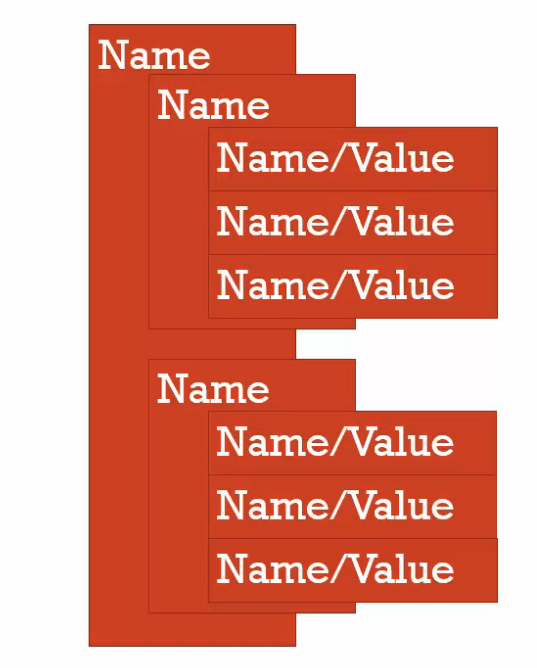
- How does an object live in your computer’s memory
- A collection of values that are given names.
- Object can contain
propertiesandmethods
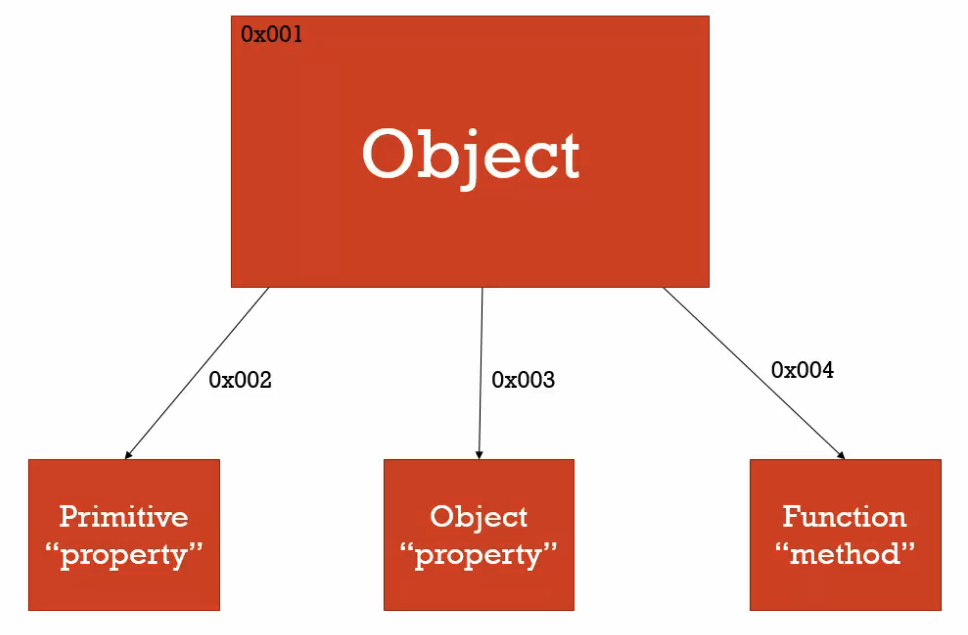
- The value of the object can be the following:
- Primitive property
- Another object property
- A function method
- It will have references to these different properties and methods
- It is important to think about an object sitting in memory has references to other things sitting in memory.
Different ways to create an object and access their properties.
Computed member access operator
[]:// Method 1 var person = new Object(); person[] // Computer member access operator [] person["firstname"] = "Tony"; person["lastname"] = "Alicea";Member access
.person.address = new Object() person.address.street = '111 Main St.';Rule of thumb: Always use
.operator unless you need to access a property using dynamic string.
- Remember an object is a collection of name-value pairs.
Objects and Objects Literals
{}There are 2 ways to create an object:
 // Method 1
 var person = { firstname: 'Tony', lastname: 'Alicea' };

 // Method 2
 person = new Object();
 person.firstname = 'Tony'
 person.lastname = 'Alicea'
Object literal syntax
{}is a powerful syntax to create object in Javascript, it is clean looking and easy to write.
Framework aside: Faking Namespaces
- Namespace: A container for variables and functions. It it typically to keep variables and functions with the same name separate.
How to prevent overriding with the same name variables?
 var greet = 'Hello';
 var greet = 'Hola';

 console.log(greet);
Solutions: Create a
container/namespaceobjectvar english = {}; var spanish = {}; english.greet = 'Hello!'; spanish.greet = 'Hola!';This is often seen in a lot of JavaScript source code to separate objects sitting in the global namespace from the global object that someone else might have written.
JSON and Object Literals
- Misconception: A lot of people think
JSONandobject literal syntaxare the same thing. JSON vs Object literal syntax
JSON Object Literal Syntax { "firstName": "Mary", "isAProgrammer": true } var objectLiteral = { firstName: "Mary", isAProgrammer: true } - Anything that is JSON valid is also a valid JavaScript object literal syntax. However, not all object literal syntax is a valid JSON. In other words, JSON properties need be wrapped in quotes
“”. JSON is technically a subset of the object literal syntax.
- Anything that is JSON valid is also a valid JavaScript object literal syntax. However, not all object literal syntax is a valid JSON. In other words, JSON properties need be wrapped in quotes
Although JSON is not a part of JavaScript. It is so popular that JavaScript does come with built-in functionalities to transfer between the two.
Example 1:
var objectLiteral = {
  firstName: "Mary",
  isAProgrammer: true
}

console.log(JSON.stringify(objectLiteral));
Example 2:
var jsonValue = JSON.parse('{ "firstname": "Mary", "isAProgrammer": true }');

console.log(jsonValue)
- Misconception: A lot of people think
- Functions are objects [IMPORTANT]
- First class functions: Everything you can do with other types you can do with functions.
- A
functionis a special type ofobject. Just like any object, it resides in memory and has all the features of a normal object and other special properties. These special properties are:
- A function does not have to have a name. It can be
anonymous. - Code property, where the code written were placed into a special property of the function object. It’s
invocable, codes sitting on the property only runs when you invoke it.
e. You can attach a property to any function, just like an object:
function greet() {
 console.log('hi');
}

greet.language = 'english';
console.log(greet.language);

//OUTPUT
english
f. An overview
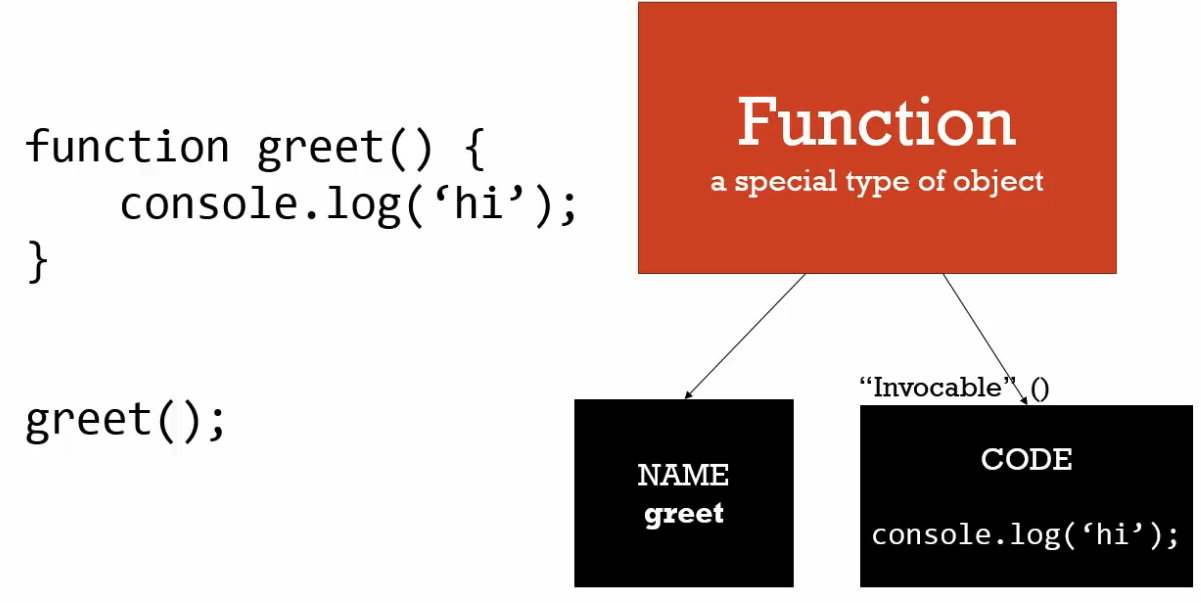
g. The function written has
- A
nameproperty - A
codeproperty
- A function does not have to have a name. It can be
Function statements vs function expressions
Expression: A unit of code that results in a value.Example:
a = 3;
// Return
3

1 + 2;
// Return
3

a = { greeting: 'hi' };
// Return
*object {greeting: 'hi'}*
Statement: A unit of code that does not return any valueExample:
if (a === 3) { }
StatementvsExpressionin JavaScriptFunction statement
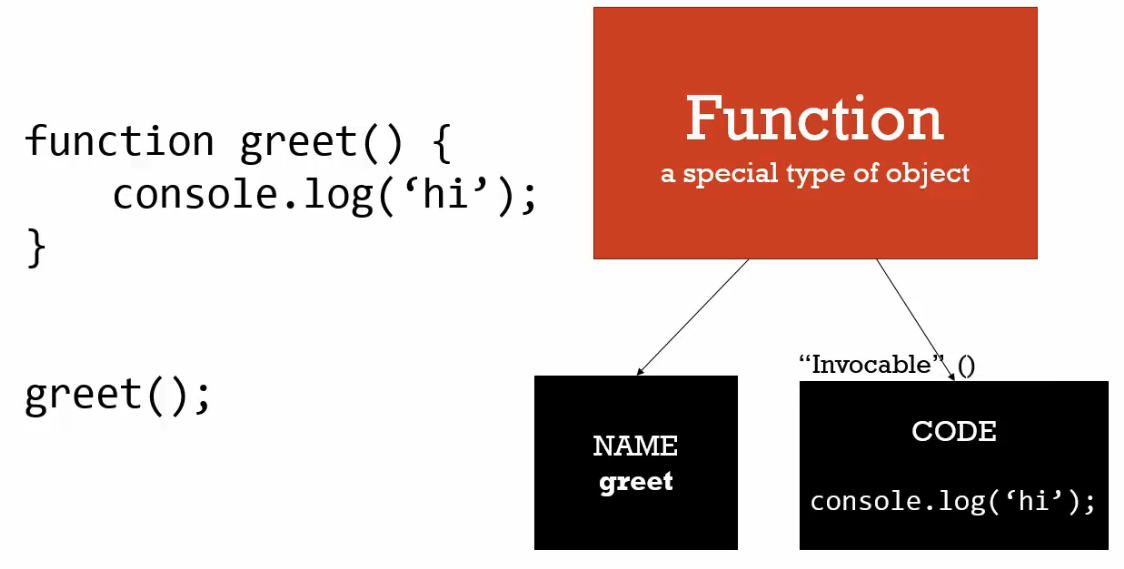
  greet()

  // Function statement
  function greet() {
      console.log('hi');
  }

  // OUTPUT
  hi
Function expression
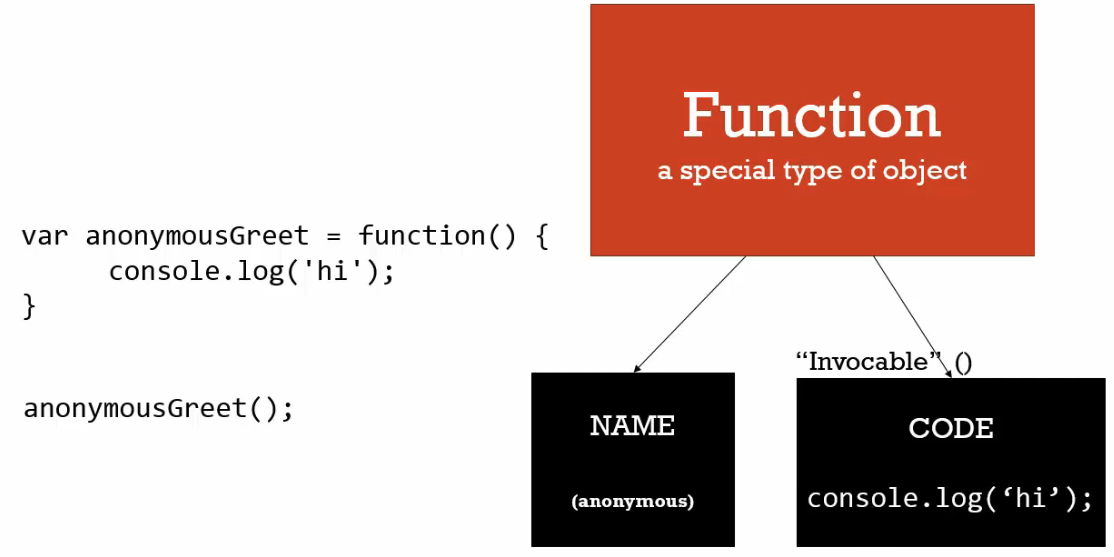
  // Function expression
  var anonymousGreet = function() {
      console.log('hi');
  }

  anonymousGreet()

  // OUTPUT
  hi
Example of printing
objectandfunctionfunction log(a) { console.log(a); } // (1) Print an non-function object log({ greeting: 'hi }); // OUTPUT *Object* {greeting: 'hi'} // (2) Print a function object log(function() { console.log('hi') }); // OUTPUT function () { console.log('hi); }How to run a function inside a function? Passing a function as a parameter to use it, called
functional programming.function log(a) { a(); } log(function() { console.log('hi'); }); // OUTPUT hi
Conceptual aside: by value vs by reference
Primitives (non-objects) vs objects
// Primitive
// By value
var a = 3;
var b;

b = a;
a = 2;

console.log(a);
console.log(b);

// OUTPUT
2
3

// Objects
// By reference
var c = { greeting: 'hi' };
var d;

d = c;
c.greeting = "HELLO"; // mutate

console.log(c);
console.log(d);

//OUTPUT
HELLO
HELLO
Applied to parameters
// by reference (even as parameters)
function changeGreeting(obj) {
 obj.greeting = 'Hola'; // mutate
}

changeGreeting(d);
console.log(c);
console.log(d);

// OUTPUT
Hola
Hola
Equal operator
Since
{ gretting: ‘howdy’ }did not exist in the memory, it will be added in new memory location andcobject will be pointed to the new memory address.c = { greeting: 'howdy' } // Because this did not exist in memory yet console.log(c); console.log(d); //OUTPUT howdy Hola
In other programming languages, you can decide whether a value is passed by value or by reference. In JavaScript, there is no such option.
- All
primitivetypes are passed by value. - All
objectsare passed by reference.
- All
Objects,Functionsandthis- When an execution context is created (every time a function is run), it gives us a variable called
this, which can be useful.thiswill be pointing to different objects depending on how the function is invoked.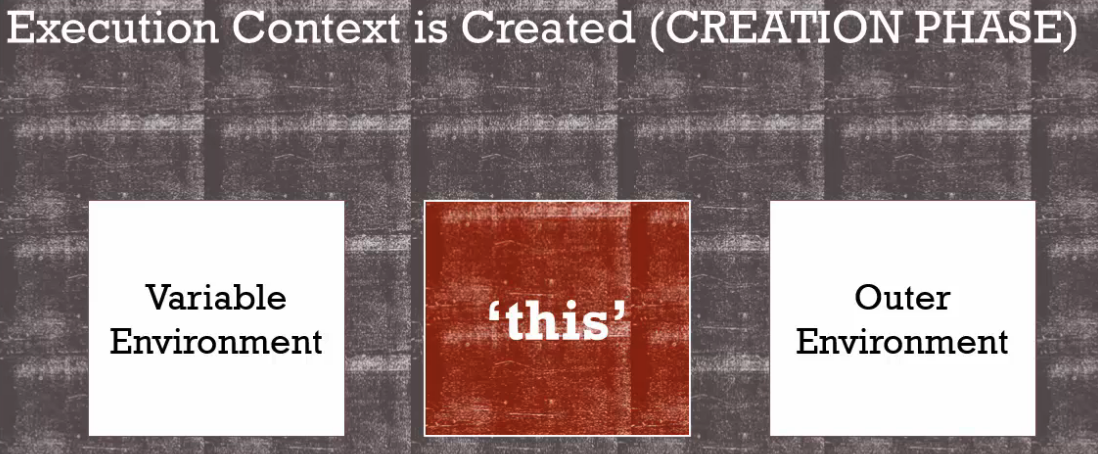
- Example of
thispointing to the globalwindowobject. - When does
thispoint to non global object? How to solve the javascript “bug”?
Let’s observe the bug
var c = {
  name: 'The c object',
  log: function() {
      this.name = 'Updated c object';
      console.log(this);

      var setname = function(newname) {
          this.name = newname; // Pointing to global object !
      }

      setname('Updated again! The c object');
      console.log(this);

  }
}

c.log()

// OUTPUT
*Object* {name: "Updated c object", ...}
*Object* {name: "Updated c object", ...}
How to fix this ‘bug’ in javascript?
var c = {
  name: 'The c object',
  log: function() {
      var self = this; // Step 1: Make self pointing to the same location memory as the this keyword

      this.name = 'Updated c object';
      console.log(self);

      var setname = function(newname) {
          self.name = newname; // Pointing to global object !
      }

      setname('Updated again! The c object');
      console.log(self);

  }
}

c.log()

// OUTPUT
*Object* {name: "Updated c object", ...}
*Object* {name: "Updated again! The c object", ...}
- When an execution context is created (every time a function is run), it gives us a variable called
Conceptual aside: Arrays - collections of anything
Javascript can store different types of data in an array. It can store primitives, objects and functions.
 var arr = [1,
             false,
             "Hello world",
             { name: "Tony" },
             function(name) {
                 var greeting = "Hello ";
                 console.log(greeting + name);
             }
 ];
We can perform different operations with the array
arr[3](arr[2].name);

// OUTPUT
Hello Tony
The advantage comes from its dynamic typing nature.
Objects and Functions
- In addition to these things, the JavaScript engine also sets up
arguments. Argumentsis a keyword of JavaScript that contains all the parameters you pass to a function.Example 1:
function greet(firstname, lastname, language){ language = language || 'en'; if(arguments.length === 0) { console.log('Missing parameters!'); return; } }…parameter wraps up the rest of parameters in an array:function greet(firstname, lastname, language, ...other){ language = language || 'en'; if(arguments.length === 0) { console.log('Missing parameters!'); return; } }
- In addition to these things, the JavaScript engine also sets up
Framework aside:
function overloadingExample 1:
 function greet(firstname, lastname, language) {
     language = language || 'en';

     if (language === 'en') {
         console.log('Hello' + firstname + ' ' + lastname);
     }

     if (language === 'en') {
         console.log('Hola' + firstname + ' ' + lastname);
     }
 }

 function greetEnglish(firstname, lastname) {
     greet(firstname, lastname, 'en');
 }

 function greetSpanish(firstname, lastname) {
     greet(firstname, lastname, 'es')
 }

 greetEnglish('John', 'Doe')
 greetSpanish('John', 'Doe')
Conceptual aside:
Syntax ParsersDangerous aside:
automatic semicolon insertion(by syntax parsers) ‼️The automatic semicolon insertion in writing
returncan cause big problem:function getPerson() { return // Syntax parser will insert ; for you (return ;) { firstname: 'Tony' } // <--- Without ';' } console.log(getPerson()); // OUTPUT undefined// Solution 1: Insert { in the same line after the return keyword function getPerson() { return { firstname: 'Tony' } } // Solution 2: Always insert ; function getPerson() { return { firstname: 'Tony' }; }Always write your own semicolon!
Framework aside: Whitespace 🗽
JavaScript is very liberal on whitespace. Take as much space as you needed to comment the code and make it readable. It is also often seen in a lot of source code. There is also no disadvantage of doing this.
 var
         // comment 1
         firstname,

         // comment 2
         lastname,

         // comment 3
         language;

 var person = {
         // the first name
         firstname: 'John';

         // the lastname
         // always required
         lastname: 'Doe'

 }
Immediately invoked functions expressions
(IIFEs)What is IIFEs (Comparison code)
 // Function statement
 // Put in memory initially
 function greet(name) {
     console.log("Hello " + name);
 }

 greet();

 // Function expression
 // Does not put in memory initially
 var greetFunc = function() {
     console.log("Hello " + name);
 };

 greenFunc();

 // Using an Immediately Invoked Function Expression (IIFE)
 // It is a function expression
 var greeting = function(name) {
     console.log('Hello ' + name)
 }();
Make sure you invoke the function with
().// Given a function expression var greeting = function(name) { return 'Hello ' + name; } // (1) DID NOT invoke the function object console.log(greeting); // OUTPUT function (name) { return 'Hello ' + name; } // (2) Invoke the function object console.log(greeting('John')); // OUTPUT Hello JohnImmediately Invoked Function Expression (IIFE) examples
 // Example 1: Without parameter
 var greeting = function(name) {
     return 'Hello ' + name;
 }();

 console.log(greeting)

 // OUTPUT
 Hello undefined

 // Example (2): With parameter
 var greeting = function(name) {
     return 'Hello ' + name;
 }('John');

 console.log(greeting) // <-- Greeting contains a string now

 // OUTPUT
 Hello John
There are different ways to run an expression without storing in a variable as followed:
 // (1) Run an expression without storing in a variable
 3;

 // (2)
 "I am a string"

 // (3)
 {
     name: 'John'
 };
However, when it comes to function. The writing below is not valid:
This is because there is no name given to the function. However, if a name is given to the function. It becomes a function statement (we do not want that).// (4) This is not valid function(name) { return 'Hello ' + name; } // OUTPUT Uncaught SyntaxError: Unexpected token (There are a few methods to trick the syntax parser in to understanding that we don’t intend to write a function statement as followed:
// METHOD 1: Wrap the function in a parenthesis (), so that 'f' is the first word (function(name) { return 'Hello ' + name; });How to creating a function and running it on-the-fly (without storing it):
 var firstname = 'John'

 // Using () to trick the syntax parser into thinking it is an expression
 // IIFE
 (function(name) {
     var greeting = 'Hello';
     console.log(greeting + ' ' + name);
 }(firstname));

 // OUTPUT
 Hello John
In summary, we learnt how to write a classic
IIFEas followed:
As a javascript developer, you see `IIFE` form/style in almost every major framework and library that’s out there today. Get familiar with it.(function() { var greeting = 'Hello'; console.log(greeting + ' ' + name); }());
Framework aside:
IIFEsandSafe CodeLet’s understand the
IIFEstep-by-step below: Since the variablegreetingdeclared inside the function is sitting on its own execution context. It is not touching the global execution context and it is useful.
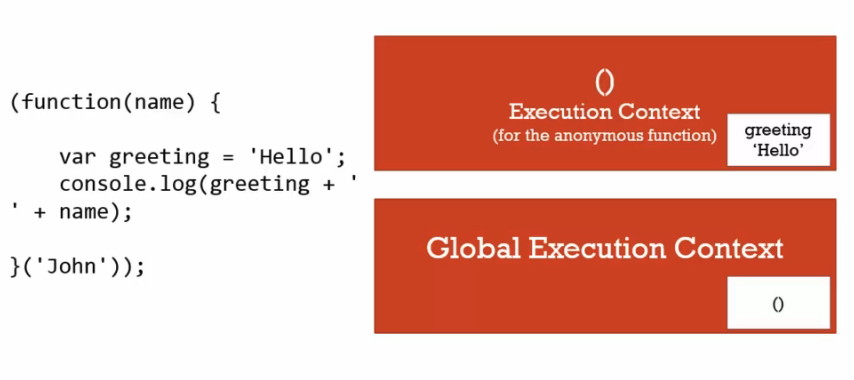// IIFE (function(name)) { var greeting = 'Hello'; console.log(greeting + ' ' + name); }('John'));- This feature allows us to write crash-less code. The
greetingvariable below exists in a separate execution context (separate addresses).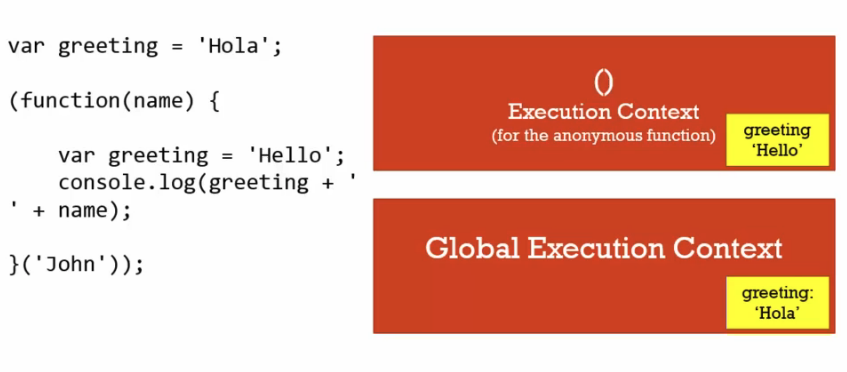
What if we want to access the global variable? Just pass by reference.
 greeting = 'Hola'

 (function(global, name) {
     var greeting = 'Hello';
     global.greeting = 'Hello'; // Override by reference
     console.log(greeting + ' ' + name);
 }(window, 'John'));

 console.log(greeting);

 // OUTPUT
 Hello
In summary, we insured that our code, through wrapping it in an immediately invoked function, does not interfere with, crash into, or be interfered by any other code that might included in the application. It is
safe. This pattern makes it difficult to affect the global object.
Understanding
closures(Notoriously difficult to understand):Examples (This is only possible with
closures):function greet(whattosay) { return function(name) { console.log(whattosay + ' ' + name); } } // Example 1 greet('Hi')('Tony'); //Invoke a function that returns a function. // Example 1 - OUTPUT Hi Tony // Example 2 var sayHi = greet('Hi') sayHi('Tony') // Example 2 - OUTPUT Hi TonyIn the example 2 (refer to the code). Here’s the step by step explaining the process:
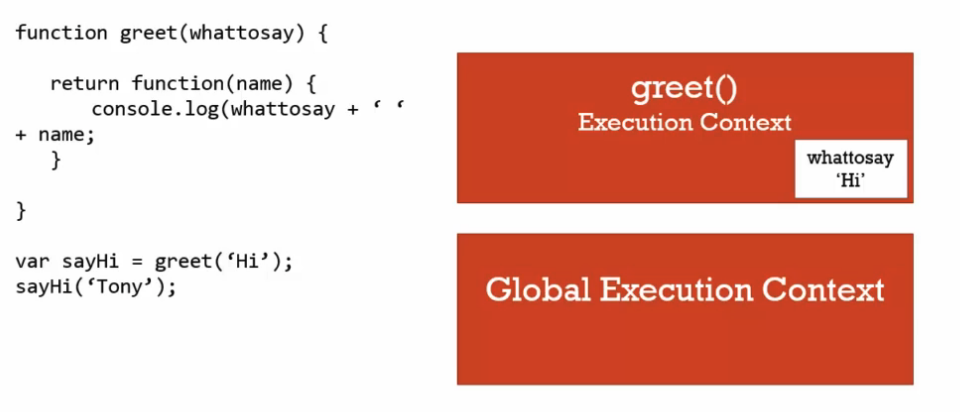
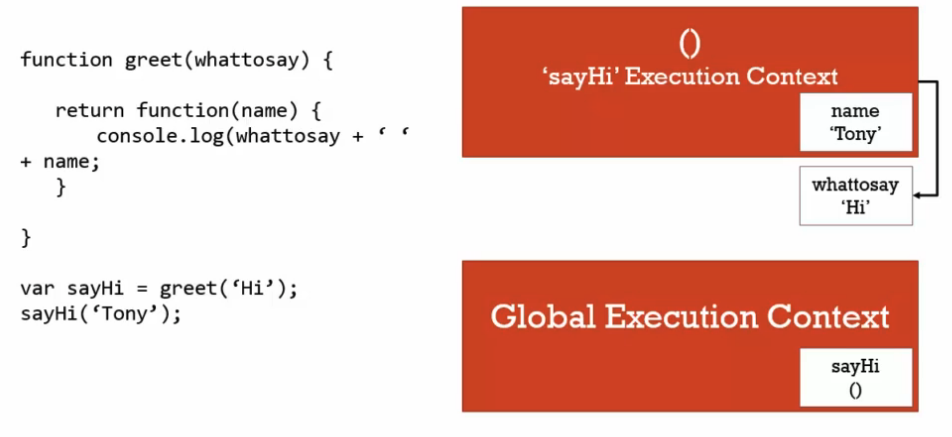
Step 1: Global execution context is created.
Step 2: When the code reaches
var sayHi = greet(’Hi’), a new execution context is created.Step 3: The string
‘hi’gets passed into thegreet()variable environment.Step 4: When the code reached
return, thegreet()'s execution context is popped off the stack (The variables and functions created inside of it still live in the space in memory)Step 5: Back to global context, now
sayHi(’Tony’)function is invoked and a new execution context is created.Step 6: The string
‘Tony’gets passed into the anonymousfunction()and is now sitting inside its variable environment.Step 7: When the code reaches the line
console.log(whattosay + ‘ ‘ + name);. The javascript engine goes up the scope chain (since it could not find it inside the function) and look for the variable in the outer environment (greet()'s function memory)
Understanding closures - Part 2
Why does the function output 3?
 function buildFunctions() {
     var arr = [];

     for (var i = 0; i < 3; i++) {
         arr.push(
             function() {
                 console.log(i);
             }
         )
     }

     return arr;
 }

 var fs = buildFunctions();

 fs[0]();
 fs[1]();
 fs[2]();

 // OUTPUT
 3
 3
 3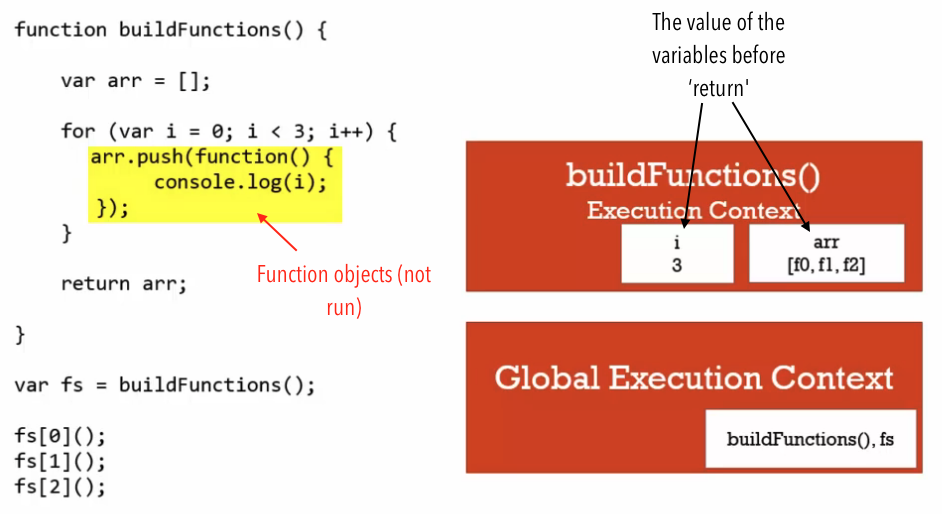
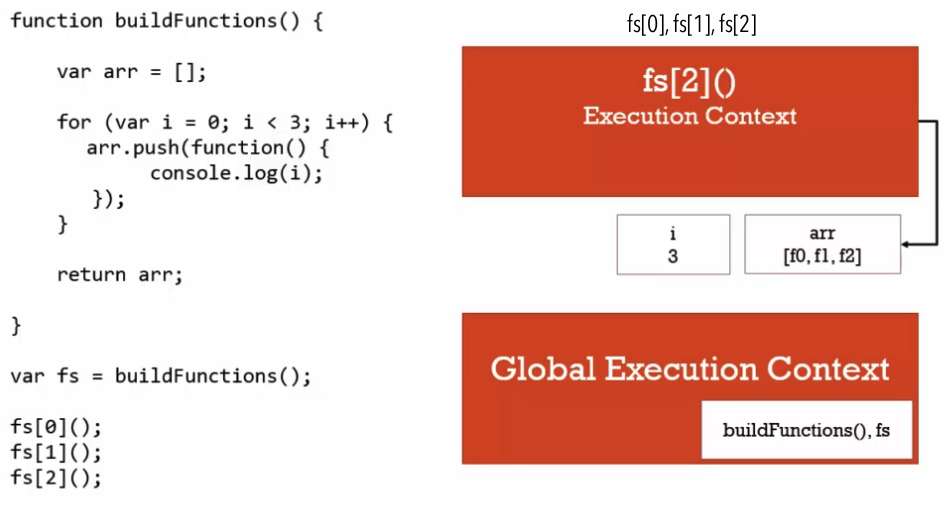
How to change the function so that it prints 0,1,2 instead?
 // Method
 function buildFunctions() {
     var arr = [];

     for (var i = 0; i < 3; i++) {
         arr.push(
             (function(value){ // (1) Closure
                 return function() {
                     console.log(j);
                 }
             }(i))  // (2) IIFE
         )
     }

     return arr;
 }

 // OUTPUT
 0
 1
 2
Framework Aside: function Factories
- Function closures allow us to declare the function only once, without passing the same argument every time.
Example:
 function makeGreeting(language) {
     return function(name) {

         if (language === 'en') { console.log('Hello ' + name) }

         if (language === 'es') { console.log('Hola ' + name) }
     }
 }

 var greetEnglish = makeGreeting('en')
 var greetSpanish = makeGreeting('es')

 greetEnglish('Tony')
 greetSpanish('es')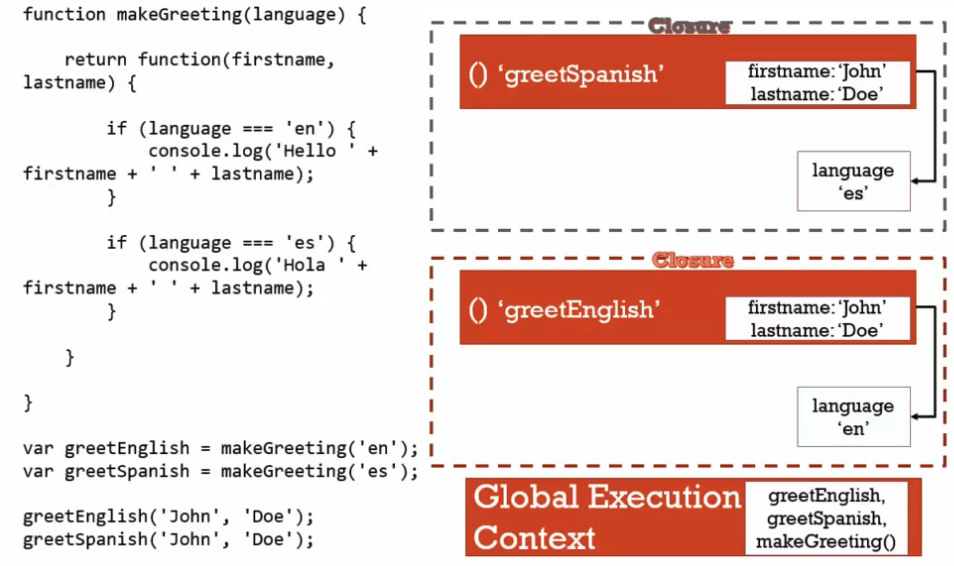
Closures and
Callbacks:A classic function that using function expression:
 function sayHiLater() {
     var greeting = 'Hi!';

     setTimeout(function() { // 1. Make use of first-class function. We're passing an (1) function object and (2) a time parameter to the setTimeout function

             console.log(greeting); // 2. The power of closures

     }, 3000);
 }

 sayHiLater();

 // OUTPUT
 Hi! // Showed after 3 seconds
JQuery uses function expressions and first-class functions:
#('button').click(function() { // Your code });- Callback function: A function you give to another function, to be run when the other function is finished. (So the function you call, ‘calls back’ by calling the function you gave it when it finishes.)
A callback function example:
 function tellMeWhenDone(callback) {
     var a = 1000; // work A
     var b = 2000; // work B

     callback(); // the 'callback', it runs the function I give it!
 }

 tellMeWhenDone(function() {
     console.log('I am done');
 });
call()vsapply()vsbind()bind(): It does not execute/invoke the function immediately.var person = { firstname: 'John', lastname: 'Doe', getFullName: function() { var fullname = this.firstname + ' ' + this.lastname; return fullname; } } var logName = function(lang1, lang2) { console.log('Logged: ' + this.getFullName()); console.log('Arguments: ' + lang1 + ' ' + lang2); console.log('------------'); } var logPersonName = logName.bind(person); logPersonName('en'); // OUTPUT Logged: John Doe Arguments: en undefined ------------call()logName.call(person, 'en', 'es'); // OUTPUT Logged: John Doe Arguments: en es ------------apply()logName.apply(person, ['en', 'es']); // OUTPUT Logged: John Doe Arguments: en es ------------Do it on-the-fly:
 (function(lang1, lang2) {
     console.log('Logged: ' + this.getFullName());
     console.log('Arguments: ' + lang1 + ' ' + lang2);
     console.log('------------');
 }).apply(person, ['en', 'es']);
function
borrowing: Borrow a function but use on another object.var person2 = { firstname = 'Jane'; lastname = 'Doe'; } console.log(person.getFullName.apply(person2)); // OUTPUT Jane DoeFunction
currying: Creating a copy of a function but with some preset parameters. It is very useful in mathematical situations. The idea is to have some fundamental functions that we can then build on with some other default parameters. The examples shown asbind()method.Example 1 (pass in 1 parameter): It is setting a permanent value for the first parameter. Whatever pass will be that second parameter.
It is equivalent to the following:function multiply(a, b) { return a*b; } var multipleByTwo = multiply.bind(this, 2); console.log(multipleByTwo(4)) // OUTPUT 8function multipleByTwo(b) { var a = 2; return a * b; }Example 2 (pass in 2 parameters): The output will be
2*2=4and ignored the passed in value5.var multipleByTwo = multiply.bind(this, 2, 2); console.log(multipleByTwo(5)); // OUTPUT 4Example 3 (multiple functions):
 var multipleByTwo = multiply.bind(this, 2);
 console.log(multipleByTwo(4));

 var multipleByThree = multiple.bind(this, 3);
 console.log(multipleByThree(4));

 // OUTPUT
 8
 12
Functional programming [IMPORTANT]
- JavaScript has many common with other programming languages such as
Lisp,SchemeorML. These languages have first class functions as discussed. Unlike
c++,c#andjava. Let’s examine the beauty of functional programming in javascript:The problem:
  var arr1 = [1,2,3];
  console.log(arr1);

  var arr2 = [];
  for (var i = 0; i < arr1.length; i++) {
      arr2.push(arr1[i] * 2)
  }

  console.log(arr2);
The solution with functional programming:
Example 1
Example 2:function mapForEach(arr, fn){ var newArr = []; for(var i = 0; i < arr.length; i++){ newArr.push(fn(arr[i])); } return newArr; } /***************************************/ var arr1 = [1,2,3]; // Work 1 var arr2 = mapForEach(arr, function(item) { return item*2; }); console.log(arr2); // Work 2 var arr3 = mapForEach(arr, function(item) { return item > 2; }); console.log(arr3); // OUTPUT [2,4,6] [false, false, true]
Example 3 (simplified example 2 without repeating `bind()`):var checkPassLimit = function(limiter, item) { return item > limiter; } var arr4 = mapForEach(arr1, checkPastLimit.bind(this, 1)); console.log(arr4) // OUTPUT [false, true, true]var checkPassLimit = function(limiter){ return function(limiter, item) { return item > limiter; }.bind(this, limiter); } var arr5 = mapForEach(arr1, checkPassLimit(1)); console.log(arr5); // OUTPUT [false, true, true]
- JavaScript has many common with other programming languages such as
Functional programming - Part 2
Go through these documentations on how they write modular JavaScript code.
4: Object-Oriented JavaScript and Prototypal Inheritance
Conceptual Aside: Classical vs Prototypical Inheritance
- Inheritance: One object gets access to the properties and methods of another object.
Classical vs prototypal inheritance
Classical inheritance Prototypal inheritance Languages C#, Java Javascript Versatility Verbose Simple, extensible, easy to understand Keywords friend, protected, private, interface
Understanding the
prototype.- All objects in JavaScript, including functions have a
prototypeproperty. Example 1 of the prototype chain:
 var person = {
     firstname: 'Default',
     lastname: 'Default',
     getFullName: function() {
         return this.firstname + ' ' + this.lastname;
     }
 }

 var john = {
     firstname: 'John',
     lastname: 'Doe'
 }

 // You don't want to use it
 // It can cause slow-down performance issue
 // __ make sure you don't accidentally type it
 john.__proto__ = person; // John now inherits from the person
 console.log(john.getFullName());
 console.log(john.firstname());

 // OUTPUT
 John Doe
 John
Example 2 of the prototype chain:
 var jane = {
     firstname: 'Jane'
 }

 jane.__proto__ = person;

 console.log(jane.getFullName());

 // OUTPUT
 Jane Default
- All objects in JavaScript, including functions have a
Everything is an Object (or a primitive)
Example 1:
 var a = {};
 var b = function() { };
 var c = [];

 a.__proto__
 b.__proto__
 c.__proto__

 // OUTPUT
 *Object* { } // toString

 *function* Empty() { } // call, bind, apply functions, it goes to the prototype and find it

 [] // indexOf, push, length functions
Example 2:
 b.__proto__.__proto__
 c.__proto__.__proto__

 // OUTPUT
 *Object* { }
 *Object* { }
ReflectionandExtendReflection: An object can look at itself, listing and changing its properties and methods.- This allows us to implement a useful pattern called
extend. Example 1:
for-inaccess every property and method not just on the object but also on the object’sprototype.// Suppose we have the code in this block var person = { firstname: 'Default', lastname: 'Default', getFullName: function() { return this.firstname + ' ' + this.lastname; } } var john = { firstname: 'John', lastname: 'Doe' } john.__proto__ = person;// Let's take a look at 'for-in' // This allows us to loop over every property and method in this object for (var prop in john) { console.log(prop + ': ' + john[prop]); }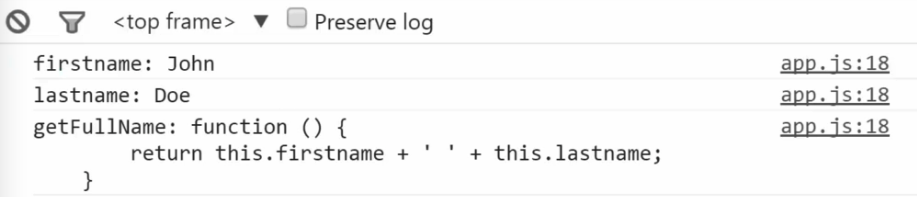
Output of the code
Example 2 (What if we only want to access what’s on the object itself?):
 for (var prop in john) {
     if (john.hasOwnProperty(prop)) {
         console.log(prop + ': ' + john[prop]); // <-- reflection:
                                                                                      // set john's properties and methods
                                                                                      // with the brackets operator
     }
 }
Output of the code above
- Shown in the above code, this concept can let us implement a useful idea as followed:
Example 1: If I output
john, he now has theaddressfrom thejaneobject andgetFirstName()function from thejimobject.Johnalso has his prototype (thepersonobject). Unlike using__proto__, these functions and properties sit physically inside thejohnobject.var jane = { address: '111 Main St.', getFormalFullName: function() { return this.lastname + ', ' + this.firstname; } } var jim = { getFirstname = function() { return firstname; } } // NOTE: using _underscore.js // This method takes all the properties and methods of these other objects // that I give it and adds them to 'john' directly. _.extend(john, jane, jim); console.log(john);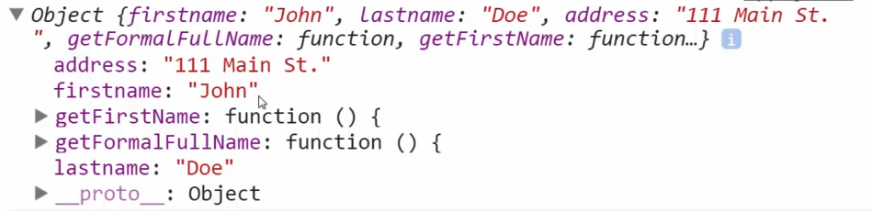
Output of the code above
- Refer to
underscore.jslibrary. The code loops through individual properties ofjimandjaneand adds them toJohn. It is copying over a reference to those properties and methods. - It is useful to understand how to use
reflectionto have thisextendpattern, not just the prototype pattern to combine and compose objects!
5: Building Objects
Function Constructors,new, and the History of JavaScript.- Besides object literal syntax
{ }, there are different ways to construct an object. - Unlike Java, JavaScript does not have classes although there is a
classkeyword. - Let’s see function constructors and the keyword
new. Example 1:
function Person() { this.firstname = 'John'; this.lastname = 'Doe'; } var john = new Person(); console.log(john); // OUTPUT *Person* {firstname: "John", lastname: "Doe" } // an object- In previous lessons, we learnt the wrong way of setting the prototype.
- In this lesson, we will examine various ways that are accepted to create objects in JavaScript. This includes adding properties, adding methods, and setting the prototype.
- The
newkeyword was basically introduced to make Java and similar language developer to feel comfortable. It is an operator. Example 1 (function constructor):
 function Person(firstname, lastname) {
     console.log(this);
     this.firstname = firstname;
     this.lastname = lastname;
     console.log('This function is invoked.');
 }

 var john = new Person('John', 'Doe');
 console.log(john);

 var jane = new Person('Jane', 'Doe');
 console.log(jane);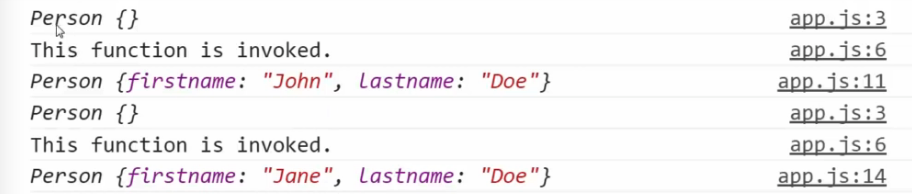
Output of the code
Function constructor: A normal function that is used to construct objects. The
thisvariable points a new empty object, and that object is returned from the function automatically.
- Besides object literal syntax
Function Constructors and
.prototype- How do we set the prototype, which is an important part of creating objects in JavaScript.
- When you use a function constructor, it already set the prototype for you.
All function in JavaScript has a
prototypeproperty. However, It’s never used unless you use thenewoperator to invoke your function. In other words, it is used only when you’re using a function as a function constructor. Specifically, when you’re using a function to build objects in this special way.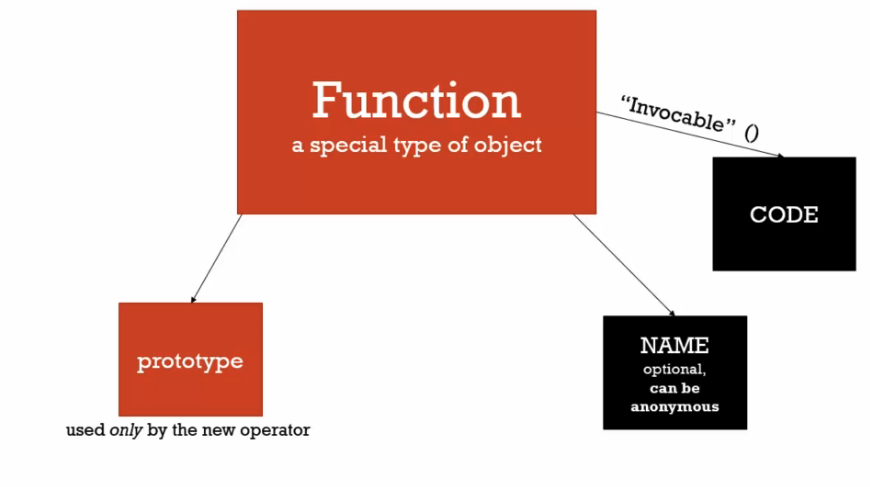
- Important: The prototype property on a function is not the prototype of the function, it is the prototype of any objects created.
Example 1 (
.prototype): This allows us to add something to the prototype property on the fly.function Person(firstname, lastname) { console.log(this); this.firstname = firstname; this.lastname = lastname; console.log('This function is invoked.'); } Person.prototype.getFullName = function() { // Prototype return this.firstname + ' ' + this.lastname; } var john = new Person('John', 'Doe'); console.log(john); var jane = new Person('Jane', 'Doe'); console.log(jane);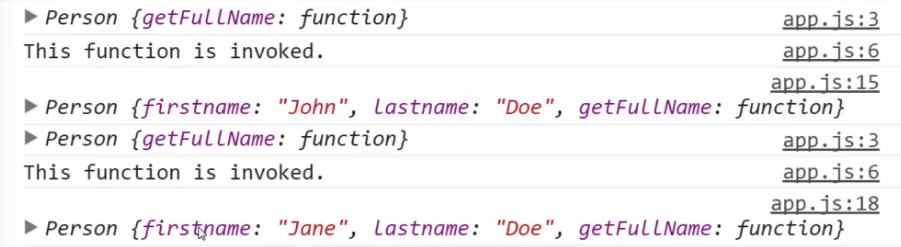
Output of the code. John and Jane objects now have getFullName() function.
Example 2 (Why are we not adding it inside the person’s object?):
**Answer**: Efficiency standpoint: Functions in JavaScript are objects and they take up memory space. We do not want every object has its own getFullName property. If we add it to the prototype, we only have one (solved the problem!).function Person(firstname, lastname) { console.log(this); this.firstname = firstname; this.lastname = lastname; this.getFullName = function() { // Why not doing this ? return this.firstname + ' ' + this.lastname; } console.log('This function is invoked.'); }
Dangerous aside: ‘new’ and functions
- What if we forgot to put the
newkeyword when creating objects? Example 1:
var john = Person('John', 'Doe');- It will return
undefined. - Solution 1 : Any function that is intended to be a
function constructorhas a capital first letter. - Solution 2: Some programs, known as
Linterswarn you when the function did not start with a capital letter whennewkeyword is used (Not a great solution). - In summary, always write your function name starting with a capital letter when you’re using it as function constructor.
- What if we forgot to put the
Conceptual aside: Built-in function constructors
- What are the function constructors that are ready-to-use inside the JavaScript engine.
Example 1: The output is an
object(not a primitive value). Because it is an object, there’s aprototype propertywhich all number objects will have access to.var a = new Number(3) a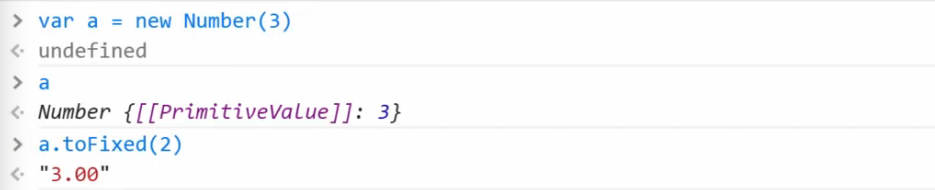
Example 2: There are cases where the JavaScript engine wraps up the primitive in its object for you so that you can use properties and methods you might want to.
 "John".length

 // OUTPUT
 4
Example 3:
 var a = new Date("3/1/2015")

 a
Output of the code
We can access those built-in functions when writing the following code. Note that these functions do not live in object
a, but rather on the date’s.prototypeproperty.Date.prototype.*{ getSeconds(), getTime(), getDate(), getMilliseconds() }*We can add our own method to the prototype as followed:
String.prototype.isLengthGreaterThan = function(limit) { return this.length > limit; } console.log('John'.isLengthGreaterThan(3));- This is the power of
prototype inheritancein JavaScript. - Many libraries and frameworks used this technique to add features.
- Be careful, you do not want to override the existing property and method.
Dangerous aside: Built-in function constructors.
- Let’s see why built-in constructors for primitive types (boolean, number, string) are dangerous.
Example 1: You are not creating primitives when using built-in function constructors.
// DANGER 1 var a = 3 var b = new Number(3) a == b // b is coerced to primitive // OUTPUT true a === b // a is a primitive whereas b is an object // OUTPUT false- In general, it is better to not use built-in function constructors when creating primitives.
- What about
dates? It is recommended that you usemomentjs.comlibrary. This helps out with some problems within that built-in constructor.
Dangerous aside: Arrays and
for…in.- Remember that array is an
object. Example 1: Arrays are object and it can iterate down into the prototype.
Let’s say we iterate the object with `for…in`:Array.prototype.myCustomFeature = 'cool'; var arr = ['John', 'Jane', 'Jim'];for (var prop in arr) { console.log(prop + ': ' + arr[prop]); }
Output of using
for…inProblem: We get that extra property when using
for…in.Solution: In arrays, it is recommended that we do not use
for…in. Use the standardforloop to iterate through the length of the array as followed to avoid such problem:for (var i = 0; i < arr.length; i++) { console.log(i + ': ' + arr[i]); }
- Remember that array is an
Object.createand Pure Prototypal inheritance.Example 1: The code below illustrates
pure prototypal inheritance. We create an objectjohnthat inherits from thepersonobject. We then change the values of those properties byoverridingthem.// Note that objects do not create new execution context var person = { firstname: 'Default', lastname: 'Default', greet: function() { return 'Hi ' + this.firstname; } } var john = Object.create(person) john.firstname = 'John'; john.lastname = 'Doe'; console.log(john);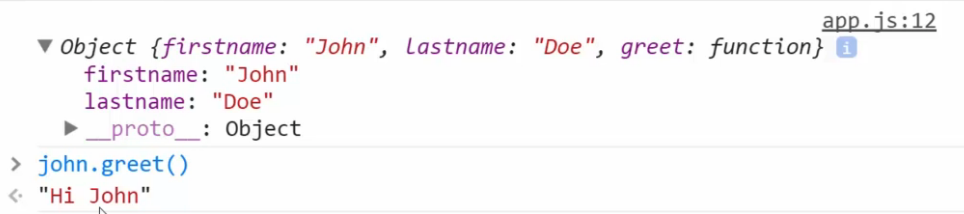
Output of the code
- When the JavaScript engine (older one) does not support
Object.create?- Answer:
Polyfill.
- Answer:
Polyfill: A code that adds a feature which the engine may lack.Example 1 (
Polyfillcode):if (!Object.create) { Object.create = function (o) { if(arguments.length > 1) { throw new Error('Object.create implementation' + ' only accepts the first parameter.'); } function F() { } F.prototype = o; return new F(); } }- The summary of
Object.create()(Prototypal inheritance):- Create an
objectthat forms the basis of my constructing all other objects. In our case, it is thepersonobject. - Use
Object.createto create other versions of it. - Override and hide the newly created object’s properties.
- Create an
- This is a powerful concept as you can mutate or change the
prototypeon the fly at any point in the application.
ES6 and Classes.
- We had seen that JavaScript does not
classes. In ES6, it hasclasskeyword in a different way. Class in ES6:
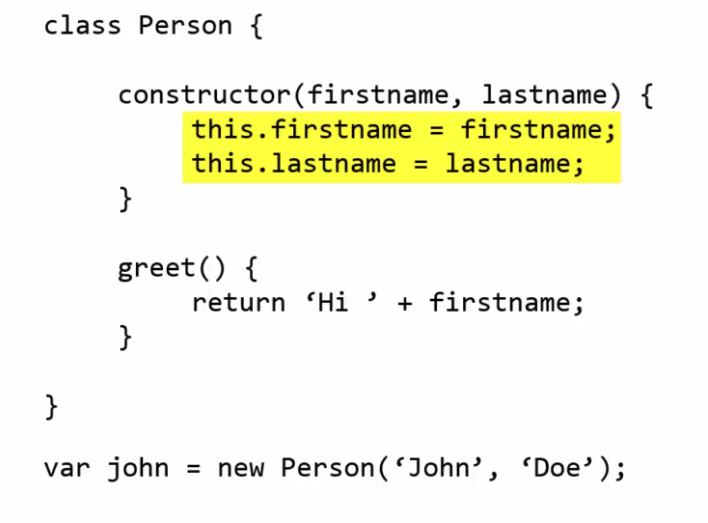
- A Javascript
classdefined anobject. - It has a
constructorthat acts like the constructor function so that we can preset its value.
- A Javascript
- Problems:
- For people coming from other programming languages, they might think it’s like a
template. - However, the class
personis actually just anobject. - We’re just creating new objects from that object.
- For people coming from other programming languages, they might think it’s like a
- Worries:
- People coming from these programming languages might not appreciate the beauty of
prototypal inheritanceand start design object structures they way they do in C#, Java or C++. This can be a huge mistake.
- People coming from these programming languages might not appreciate the beauty of
In this case, how do we set the prototype?
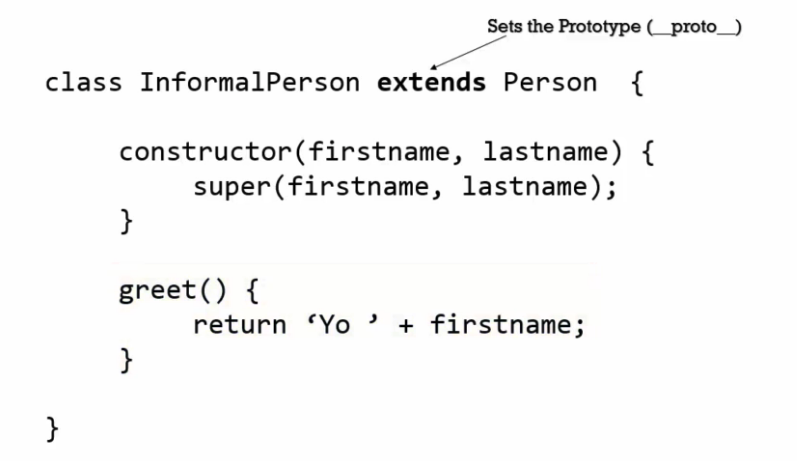
The use of
extendskeyword of setting the prototype properties.In summary, the create of objects are the same despite there are new syntax in ES6 for creating these objects. These syntax are just
syntactic sugar.
- We had seen that JavaScript does not
6. Odds and Ends
Initialization: Don’t be intimidated by the initialization like the following code.
If you’re missing a `,`, you can expect errors as followed:var people = [ { // the john's object firstname: 'John', lastname: 'Doe', addresses: [ '111 Main St.', '222 Third Str.' ] }, { // the jane's object firstname: 'Jane', lastname: 'Doe', addresses: [ '333 Main St.', '444 Fifth St.' ], greet: function() { return 'Hello!'; } } ]Unexpectederrors.